How to Accept Payments When Customers Book an Appointment on WordPress


How to Accept Payments When Customers Book an Appointment on WordPress
There is a point where a WordPress contact form stops being enough.
A customer finds your service.
They decide they want an appointment.
They choose a time.
And then, instead of being able to finish everything there, the payment part happens somewhere else.
You send a payment link.
They pay later.
You check whether the payment arrived.
Then you confirm the appointment.
It works.
It also creates a few extra steps for something that could have been finished in one go.
If you sell paid consultations, coaching sessions, classes, appointments or other time-based services, a WordPress appointment booking payment setup can bring those pieces together.
The website handles the first part of the journey.
The booking system handles availability.
The payment step happens when the customer books.
The appointment is then confirmed.
That is the basic idea behind adding payment to WordPress appointment booking. It is not really about putting a payment button on a page. It is about connecting the booking and payment parts so the customer doesn't have to start a second process after choosing a time.
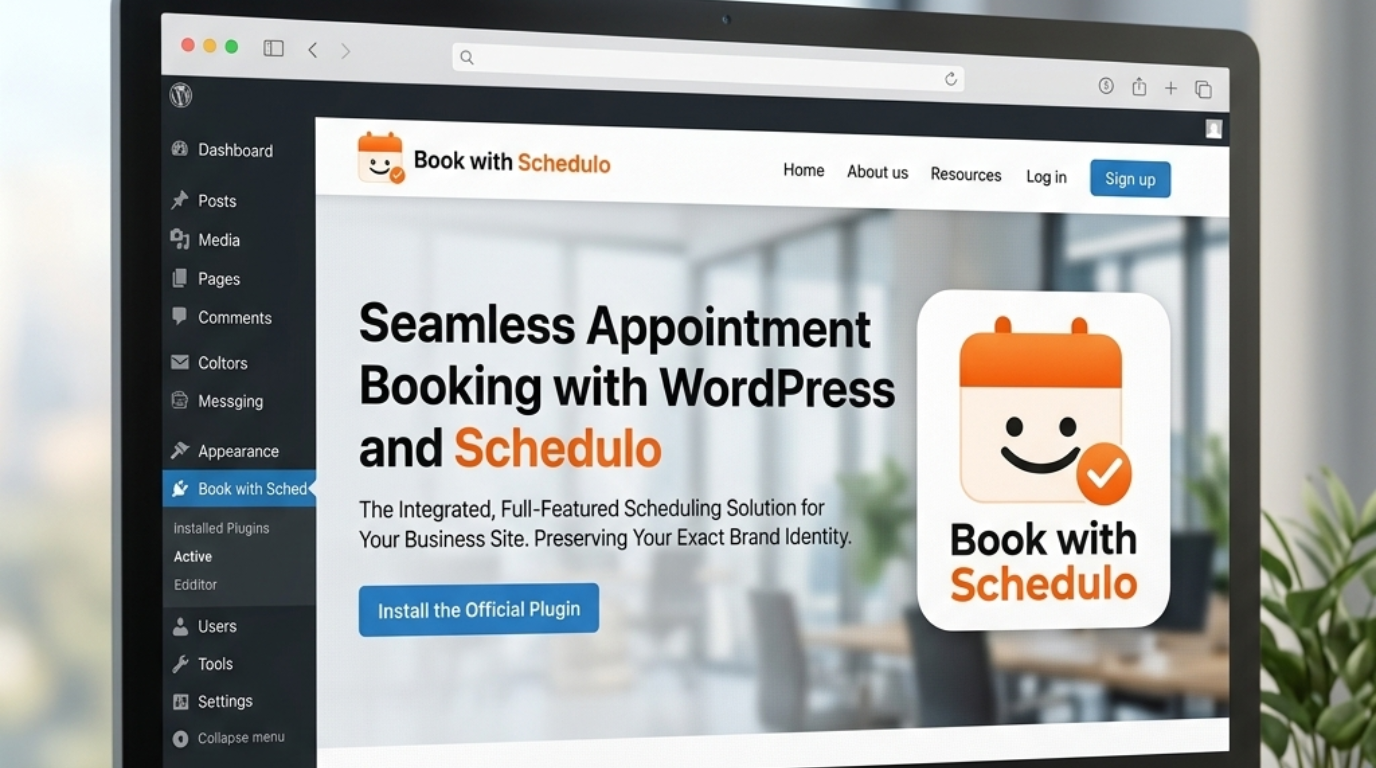
Book with Schedulo's WordPress plugin lets you place the Schedulo booking experience on a WordPress page using the Gutenberg block or shortcode. The payment itself is handled through the Schedulo booking flow, with Razorpay available for paid appointments.
Why collect payment during the booking?
Think about a customer booking a paid consultation.
They have three things to settle:
What are they booking?
When is it happening?
What does it cost?
A good booking flow answers all three at the same time.
They choose the appointment.
They choose a time.
They pay.
The appointment is confirmed.
Compare that with a manual process:
They choose a time.
You receive the booking.
You send payment instructions.
They have to leave the booking process.
They pay.
You check the payment.
Then you confirm the appointment.
The second version isn't necessarily wrong. There are businesses where payment later makes sense.
But when you want the appointment to be confirmed only after payment, combining the two removes a lot of unnecessary back-and-forth.
It can also make the customer's expectations clearer.
They know from the beginning that the appointment is paid.
They know the amount.
They know when the appointment is.
They don't have to wait for a second message from you.
Booking first and paying later isn't always a bad idea
This is important because collecting payment during booking isn't automatically the right answer.
A consultant offering a free introductory call probably shouldn't ask for payment.
A healthcare or professional service business may need to collect payment differently depending on its process.
A long-term client may already have an arrangement where invoices are handled separately.
And some businesses prefer a deposit rather than the full amount.
The booking system should allow you to reflect that rather than forcing every appointment into the same payment rule.
Book with Schedulo supports both full payment and deposits for paid booking types, so you can decide how the transaction should work for each appointment.
That makes it possible to have different booking types on the same account.
For example:
15-Minute Intro Call — Free
60-Minute Strategy Session — Paid
The first appointment can stay friction-free.
The second can require payment before the booking is completed.
The customer does not need to understand the difference technically.
They just see the option that applies to them.
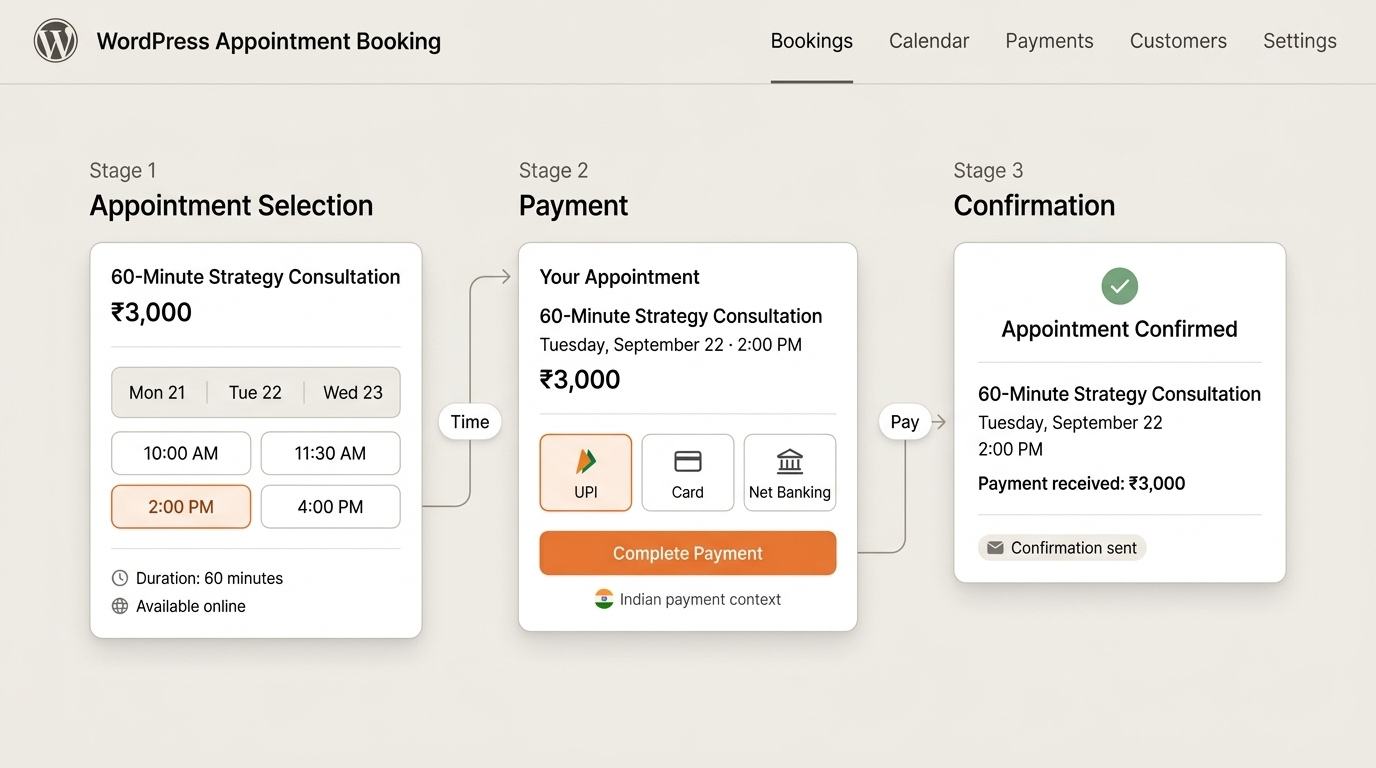
What a WordPress appointment payment flow actually looks like
The WordPress site is mainly the place where the customer enters the process.
Imagine a consultant has a page called:
Business Consulting
The page explains the service.
There is a button:
Book a Consultation
The customer clicks.
The Schedulo booking experience opens.
They select the consultation.
Available times are shown.
They choose one.
If that appointment requires payment, the payment step appears before the booking is completed.
They pay.
The appointment is confirmed.
That is the important distinction.
The WordPress page does not need to become a custom checkout application.
The booking system handles the appointment and payment flow.
The current Book with Schedulo WordPress plugin supports inline booking, a popup button and a floating button, and can be added through the Gutenberg block or shortcode. The plugin itself embeds the booking experience rather than storing customers' booking data inside the WordPress plugin.
That also means you can keep your existing WordPress design.
You don't need to rebuild the site around the booking system.
Where should the payment-enabled booking button go?
This is one of those small decisions that makes the whole setup feel much better.
Put the booking action where the customer has enough information to make a decision.
For a consultant, that could be the consulting service page.
For a coach, the page describing a specific coaching session.
For a freelancer, a service page or project consultation page.
For a salon, the page describing the appointment.
The button can simply say:
Book a Consultation
or:
Book Your Session
There is no need to put a large payment form beside it.
The customer first decides whether they want the service.
The booking flow then handles the details.
This is also why the WordPress button implementation matters. A popup can keep the visitor on the service page while opening the booking process, while an inline booking calendar may be more appropriate on a dedicated booking page. The current plugin supports both approaches.
You don't need a separate payment page
This is where a proper booking system is different from simply adding a payment button to WordPress.
Suppose a customer clicks:
Pay ₹3,000
What are they paying for?
Which appointment?
Which time?
Is that slot still available?
Have they actually booked?
A payment button by itself doesn't answer those questions.
A booking-and-payment flow can.
The customer chooses the appointment first.
The system checks availability.
The customer selects the time.
Then the payment is connected to that booking.
That's the part that makes the flow useful.
You are not just collecting money.
You are collecting money for a specific appointment that has a specific time attached to it.
That distinction becomes even more important when more than one appointment type is available.
What payment methods should WordPress booking support?
This depends on your customers.
There isn't much point choosing a booking system with five payment gateways if the one your customers actually use is missing.
For Indian customers, UPI can be particularly important.
Some customers will prefer cards.
Some will use net banking.
Book with Schedulo currently uses Razorpay for appointment payments and supports UPI, cards and net banking through that payment flow.
That gives the customer familiar ways to pay without you having to send a separate payment request afterward.
For an India-focused service business, that can be more useful than having a long list of payment providers that your customers never use.
The broader guide to accepting online payments when customers book an appointment goes deeper into the payment side itself. This article is narrower: how that payment experience fits into a WordPress website.
Full payment or deposit?
There are two common situations.
You want the entire appointment paid upfront.
Or you want to collect part of the amount and the rest later.
A full-payment model is straightforward.
A customer books a ₹2,500 consultation.
They pay ₹2,500.
The booking is confirmed.
A deposit is different.
A customer books a ₹10,000 service.
You collect ₹2,000 during booking.
The rest is handled according to your normal process.
There are good reasons to use either.
A full payment may make sense for a fixed-price consultation, coaching session or class.
A deposit can be more practical for a higher-value service where the final amount depends on what the customer needs.
The important part is that the payment expectation is clear before the customer reaches the final step.
You don't want someone to think they have secured an appointment and only discover afterward that a payment is required.
What happens when payment succeeds?
This is another reason to connect payment to the booking process rather than manually handling the two separately.
A successful payment should not leave the customer wondering whether the appointment actually went through.
They should receive confirmation.
You should receive the booking notification.
The appointment should appear in the scheduling system.
Book with Schedulo's current booking flow sends confirmation emails after the booking, and automatic reminders can follow before the appointment.
That means the sequence doesn't stop at:
Payment successful
It continues to:
Payment successful → appointment confirmed → reminders sent
That is much closer to what a customer expects from an online booking experience.
What if payment fails?
This is a situation that manual processes often make messy.
A customer selects a time.
They attempt payment.
The payment does not complete.
What should happen?
You don't want to treat an unpaid appointment as though everything is finished.
The booking and payment states need to make sense together.
This is another reason not to bolt a separate payment button onto a WordPress booking page without thinking through the flow.
The important question isn't just:
Can my website accept payment?
It is:
What happens to the appointment when payment doesn't happen?
For paid appointments, the goal is usually that the customer does not end up with a confirmed booking and no successful payment.
That is one of the practical differences between an integrated booking payment flow and simply putting a payment button somewhere near a calendar.
A WordPress appointment payment flow can still stay simple
You don't need to make the page feel like an online store.
In many cases, the WordPress side can remain very minimal.
For example:
60-Minute Strategy Session
A short explanation.
Price.
A clear:
Book Your Session
button.
The customer clicks.
The booking page opens.
They choose the time.
They pay.
Done.
That is enough.
You don't need a payment button next to the calendar and another form below it.
You don't need to put your payment instructions on the service page.
You don't need to explain every step of the transaction before the customer has even clicked Book.
The booking flow can handle the details.
What if the website already has a payment system?
This is where you should slow down before adding another integration.
A WordPress site might already use WooCommerce.
It might already have a payment plugin.
It might already have a checkout system.
That doesn't necessarily mean the existing payment setup is the right tool for appointment booking.
A store checkout answers:
What product are you buying?
An appointment booking flow needs to answer:
What service are you booking, when are you booking it, and what do you need to pay?
Those are related, but they are not identical problems.
If your business already has a sophisticated WooCommerce setup, integrating appointments into that ecosystem may make sense.
For a consultant with a few paid sessions, it may create more complexity than it removes.
This is one reason a dedicated appointment booking platform can be useful.
The booking logic and payment logic already belong together.
The WordPress plugin is the bridge, not the payment processor
This distinction is important with Book with Schedulo.
The current WordPress plugin is there to put the booking experience onto your WordPress site. It supports the Gutenberg block and shortcode and can show the booking page inline, in a popup or through a floating button.
The booking and payment experience itself comes from Book with Schedulo.
So the architecture is closer to:
WordPress website → Schedulo booking experience → payment when required → confirmation
rather than:
WordPress website → WordPress payment form → manually create appointment
That keeps the appointment logic in one place.
It also means that the customer does not have to care which part of the system is handling what.
They just book.
When should a business require payment?
There isn't one answer for every service.
A paid consultation is an obvious candidate.
A coaching session may be another.
A training class could require payment before reserving the seat.
A professional service might prefer a deposit.
A free discovery call probably shouldn't.
A business that works on invoices for established customers may not need upfront payment at all.
The useful question is:
What problem are you trying to solve by collecting payment at booking?
If the issue is customers reserving time and then disappearing, requiring payment or a deposit can add commitment.
If the issue is simply that you don't want to manually send payment links, collecting payment during booking removes that administrative step.
If payment creates more friction than it solves, leave it out.
The software should give you the choice.
Paid and free appointments can live together
This is one of the more practical setups for consultants and service businesses.
Imagine your WordPress page has two appointment options:
15-Minute Introductory Call — Free
60-Minute Strategy Session — ₹3,000
The first gives new customers a low-friction way to understand the service.
The second is a paid appointment.
The customer selects the one they actually want.
The payment requirement follows that appointment.
Book with Schedulo supports different booking types, so businesses can separate free and paid sessions rather than trying to make every appointment follow the same rule.
That is much easier to explain on a website too.
You aren't saying:
“Every appointment requires payment.”
You're saying:
“Here are the appointments available. This one is free. This one is paid.”
The customer chooses.
What should customers see after paying?
The payment step should feel like part of the booking, not the end of a completely different transaction.
Ideally, the customer knows:
the appointment they chose,
the date,
the time,
the amount paid,
and what happens next.
The confirmation should reinforce those details.
Book with Schedulo sends booking confirmations automatically, and reminders can follow before the appointment. Its WhatsApp integration can also send confirmations and reminders to customers who opt in.
That creates a much more complete flow than simply showing a payment-success screen.
The customer isn't left wondering:
“Okay, I paid. But did I actually book?”
WordPress booking payment should work on mobile too
This gets overlooked because the website itself may have been designed on a desktop.
But customers may be booking from:
their phone,
an email,
WhatsApp,
a social post,
or a QR code.
The payment screen needs to be comfortable on a smaller display.
If someone has already decided to pay for an appointment, you don't want the final stage to feel harder than the booking itself.
This is another reason to test the entire process as a customer.
Don't just check that the WordPress button opens.
Start from the page.
Choose the paid appointment.
Choose a time.
Complete payment.
Look at the confirmation.
Then try it on your phone.
That is the real test.
You don't need payment on every booking page
This is worth saying because once the feature is available, it is tempting to use it everywhere.
You don't have to.
A business can have:
Free intro call
Paid consultation
Free discovery session
Paid workshop
Paid follow-up
The payment rule can follow the appointment rather than the website.
That gives you more flexibility and usually produces a clearer customer experience.
The visitor isn't confronted with a payment requirement before they know what they are booking.
They encounter it when they choose an appointment that actually costs money.
A simple setup for a WordPress service business
For a consultant or small service business, the whole setup can be quite small.
Create the appointment in Book with Schedulo.
Decide whether it is free, paid or deposit-based.
Set your availability.
Connect your calendar.
Install the Book with Schedulo WordPress plugin.
Add the booking button to the relevant service page.
When someone chooses the paid appointment, payment is handled as part of the booking flow.
After payment, the booking is confirmed and reminders can take care of the follow-up.
You can then share that same booking page elsewhere.
The website button is one entry point.
Your booking link is another.
Your QR code can be another.
The underlying appointment does not need to change.
When payment during booking is probably worth it
I would seriously consider requiring payment when:
the appointment itself is the product,
your time is limited,
customers regularly book and then disappear,
you spend too much time sending manual payment requests,
or you want the booking to be confirmed only after payment.
A paid consultation is a good example.
The customer isn't buying something separately from the appointment.
The appointment is what they are buying.
Putting payment inside the booking process is therefore fairly natural.
When I wouldn't require it
There are good reasons not to require payment too.
You may offer introductory calls.
You may work with corporate clients who pay by invoice.
You may need to confirm the appointment before taking payment.
You may be using a different commercial process for existing customers.
There is no reason to force a payment workflow just because your appointment software supports one.
The point is to remove unnecessary work, not create a new rule.
WordPress + booking + payment should feel like one action
This is really the goal.
The customer doesn't care whether WordPress is hosting the page.
They don't care which plugin creates the button.
They don't care which service handles the payment.
They care about one thing:
Can I book this appointment without a lot of hassle?
A good flow makes the answer yes.
They read the service.
They click.
They choose a time.
They pay when necessary.
They receive confirmation.
Then the reminder arrives later.
No separate payment email.
No asking whether the payment has gone through.
No manual confirmation for every booking.
That is what a WordPress appointment booking payment setup should accomplish.
The website is simply the front door.
The booking system handles the appointment.
The payment step takes place at the point where it makes sense.
And the customer gets a clear path from interest to confirmed appointment.
For the broader explanation of appointment payments, see How to Accept Online Payments When Customers Book an Appointment.
For the WordPress implementation itself, the Book with Schedulo WordPress plugin adds the booking experience to WordPress through Gutenberg or shortcode. The plugin supports inline, popup and floating booking options, while the booking and payment process remains on the Schedulo side.
The end result can be surprisingly simple:
Choose the appointment.
Choose the time.
Pay if required.
Get booked.