How Small Businesses Can Automate the Journey From Lead to Booked Appointment


How Small Businesses Can Automate the Journey From Lead to Booked Appointment
Getting a new lead feels good.
Someone has filled out your contact form. They have sent you a WhatsApp message. Maybe they found you through Instagram and asked, “How can I book a consultation?”
At that point, you might think the difficult part is over.
It isn't.
The lead still has to become a conversation. The conversation has to become an actual booking. Then the customer has to remember the appointment and, ideally, show up for it.
For a small business, a lot of this is still handled manually.
You reply to the enquiry.
You answer a few questions.
You ask when they are available.
They tell you a day.
You check your calendar.
That time doesn't work, so you suggest another one.
Eventually, you agree on a time and add it to the calendar.
Nothing about this sounds particularly difficult. The problem is doing it over and over again.
And that's where automation can make a difference.
Not by replacing the person running the business, but by taking some of the repetitive work out of the journey between a new lead and a confirmed appointment.
Start with what happens after someone becomes interested
Before choosing any automation tool, look at what happens today.
Someone sees your service and decides they are interested. What happens next?
If they have to send you a message and wait for you to respond, that's the first thing to look at.
For some businesses, a conversation is necessary. A customer may have questions about the service, pricing or whether it is suitable for them.
But sometimes the person already knows what they want.
They don't need a conversation about booking a 30-minute consultation. They just need to know when you are available.
In that situation, asking them to message you, waiting for a response and then going back and forth about times is unnecessary.
A booking page can take care of that part.
The customer can see the available times, choose one and provide the information needed for the appointment.
The important thing is that the booking option should be easy to reach.
If your leads come from Instagram, put the booking link there.
If they usually contact you on WhatsApp, share it in the conversation.
If they find you through your website, give them a clear way to book from the service page.
For example, a consultant could have a simple “Book a Consultation” button below the description of the service instead of asking every interested visitor to send an email first.
That is the first small piece of automation: don't make the business owner manually connect a customer to an available time when the customer can do it themselves.
Not every lead should go through the same process
This is where businesses sometimes overcomplicate automation.
They create one workflow and try to push every person through it.
But someone asking, “What does your service include?” is not in the same position as someone saying, “I'd like to book tomorrow at 3 PM.”
The first person may need information.
The second person is ready to book.
Those two people shouldn't necessarily get the same response.
A simple way to handle this is to separate leads based on what they are actually trying to do.
If someone needs information, give them the information.
If someone is ready to talk, let them schedule a call.
If someone wants to buy a service directly, take them to the relevant booking and payment process.
This doesn't have to mean building a complicated sales funnel.
Even a small business can have a few clear paths.
The mistake is automating the entire customer journey before understanding it.
Follow-up is often the part that gets forgotten
Here's a common situation.
Someone contacts you on Monday.
You answer their questions.
They say they'll think about it and get back to you.
You fully intend to follow up.
Then Tuesday gets busy.
Then Wednesday.
By Friday, there are new enquiries, existing customers and other things that need your attention.
The lead is still interested, but nobody has contacted them.
This is one of the less obvious places where automation can help.
You don't necessarily need a sophisticated CRM to solve it.
The important thing is simply knowing which leads still need attention.
For example:
New enquiry → Conversation started → Interested → Booking pending → Booked
If somebody is sitting in “Booking pending,” you know there is still something left to do.
A reminder can then be sent after an appropriate amount of time.
The wording doesn't need to be complicated.
It can simply remind the person about the service and give them an easy way to continue.
The point isn't to send people a series of automated sales messages.
It is to avoid losing genuinely interested people because the business owner forgot to follow up.
Give people a way to book without waiting for you
This is probably the easiest part of the journey to automate.
Once someone has decided they want an appointment, they shouldn't necessarily have to wait for the business owner to check the calendar.
This is especially important outside normal working hours.
A potential customer might decide at 9 PM that they want to schedule a consultation.
You're not working at 9 PM.
That's fine.
Your booking page can still be available.
With an online booking system, you can define your working hours and available appointment types in advance. The customer then sees the times you have actually made available.
That is much easier than exchanging messages like:
“Are you free Thursday?”
“No, I'm booked then.”
“Friday?”
“Morning or afternoon?”
“Afternoon.”
“2 PM?”
“Can we do 4?”
The customer gets a quicker answer.
You get fewer messages.
And the lead can become a booked appointment without you being involved in every step.
Your calendar should do some of the work
Once customers are booking themselves, the next problem is availability.
You don't want customers choosing times that aren't actually available.
That's why calendar synchronization matters.
If you already have appointments on your calendar, your booking system should take those into account rather than making you manually block every unavailable slot.
The same applies to working hours and buffer time.
A business might not want appointments back-to-back all day. A consultant may need 15 minutes between calls. A salon may need time to prepare for the next customer.
Those rules should be part of the scheduling process.
You set them once.
The customer sees the resulting availability.
That's a much better use of automation than constantly checking the calendar yourself.
The booking should confirm itself
There is another small part of the process that businesses often handle manually.
The confirmation.
A customer books an appointment and then waits to hear:
“Okay, you're booked for Thursday at 3.”
There isn't really a reason for someone to send that message manually.
Once the appointment is successfully booked, the customer should receive the relevant details automatically.
Date.
Time.
Service.
Location or meeting link.
Anything else they need before the appointment.
This also removes a little uncertainty.
The customer knows the booking went through.
The business knows the appointment has been recorded.
Neither side has to start another conversation just to confirm something that the system already knows.
Payment can be part of the same journey
This depends on the business.
A free discovery call doesn't necessarily need payment.
A paid consultation might.
A tutor may collect payment for a lesson. A coach may want payment before reserving a session. A service provider may require a deposit.
In those cases, payment shouldn't necessarily be treated as a completely separate process.
If a customer has already chosen the service and the appointment time, asking them to book first and then sending another message with payment instructions adds another step.
An online booking system that supports payments can bring those pieces together.
The customer chooses the service.
They choose the available time.
They pay if payment is required.
The appointment is confirmed.
The exact payment setup will depend on the business, its customers and the countries it serves, but the basic idea is the same: remove unnecessary steps between someone deciding to book and actually completing the booking.
Then comes the part people tend to forget about: the appointment itself
Getting the booking is not the end of the journey.
A customer who books today for an appointment next week can forget about it.
They might have meant to reschedule.
They might have written the wrong time down.
They might simply have had a busy week.
This is why reminders belong in the same workflow.
Instead of checking tomorrow's calendar every evening and manually messaging every customer, reminders can be sent automatically.
The reminder can include the appointment details and, where supported, give the customer a way to reschedule.
That last part is useful.
A customer who realises on Wednesday that they can't make Thursday's appointment doesn't necessarily need to become a no-show.
If they can choose another available time, the appointment can continue rather than disappearing altogether.
Book with Schedulo, for example, combines online booking with calendar availability, confirmations, reminders and appointment management. Businesses can also share booking links through channels such as WhatsApp and use QR codes when the booking journey starts offline.
The software isn't replacing the relationship with the customer.
It's handling the parts of the relationship that don't need someone sitting behind a phone or laptop.
What about leads that aren't ready to book?
Not every lead should be pushed towards a calendar immediately.
Someone may be interested but still comparing options.
Someone else may need to discuss the service with a colleague.
A potential client may want to know the price before deciding whether to book.
This is where automation should stop and the human part should begin.
A good automated system should make it easier for a lead to move forward when they're ready.
It shouldn't make the decision for them.
For example, you might send useful information after an enquiry and then give the person a booking link when they're ready to talk.
That is very different from sending five automated messages asking whether they've booked yet.
The best automation is often the automation the customer barely notices.
You don't need ten different tools
There is also a practical issue for small businesses.
It is easy to end up with too many tools.
One tool collects leads.
Another handles email.
Another manages the calendar.
Another takes payments.
Another sends reminders.
Another handles bookings.
Now the business owner has to make sure all six systems are talking to each other.
That's not necessarily automation.
Sometimes it's just moving the manual work around.
Before adding another tool, look at the actual journey.
Where does the lead enter?
Where is the lead stored?
How does the person get to a booking?
How does the appointment get onto the calendar?
How is the customer reminded?
What happens if they need to reschedule?
Where is payment collected?
The fewer unnecessary handoffs between these steps, the easier the system is to maintain.
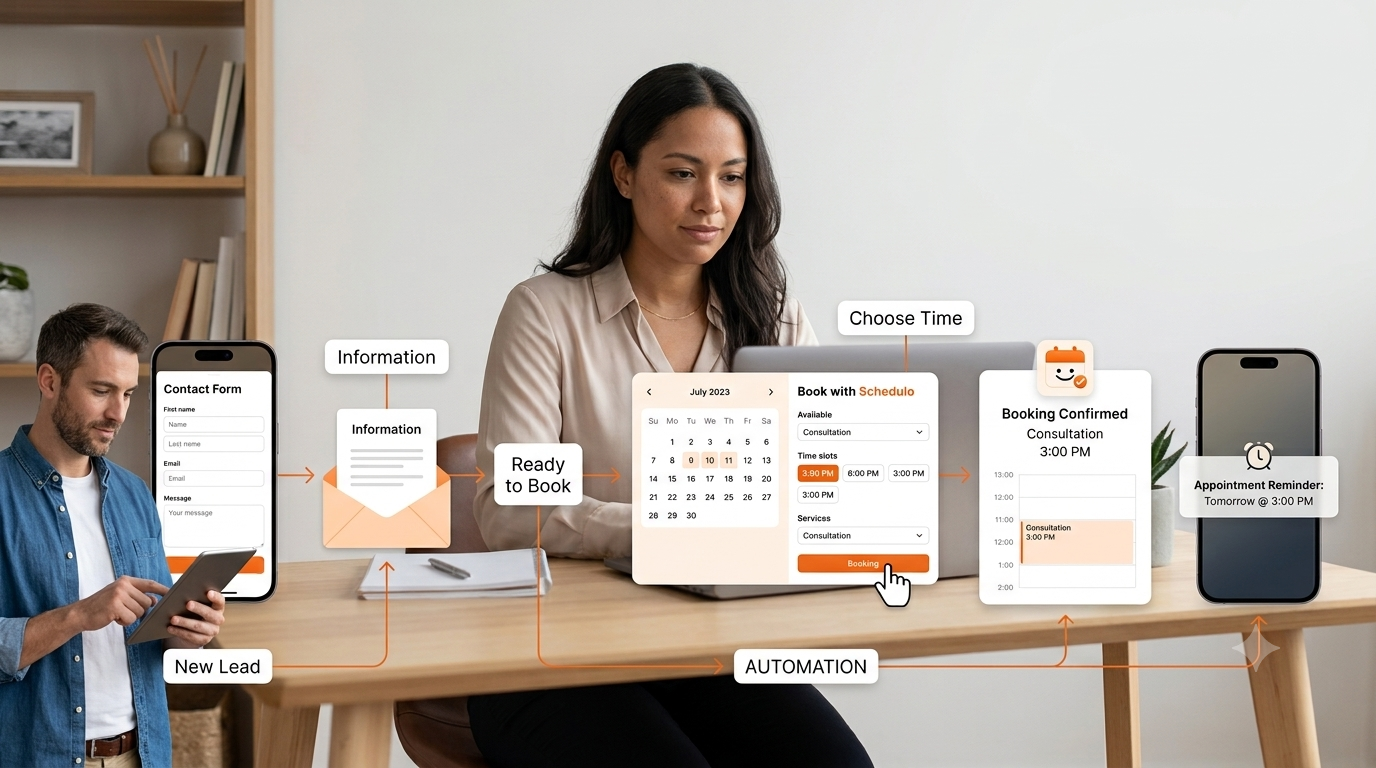
A simple lead-to-appointment workflow
For many service businesses, the first version can be surprisingly simple.
A customer finds the business.
They send an enquiry or visit the website.
They get the information they need.
If they're ready to talk, they are given a booking option.
They choose an available time.
The appointment is added to the calendar.
They receive confirmation.
A reminder is sent before the appointment.
If their plans change, they can reschedule rather than simply disappearing.
That's already a significant improvement over manually coordinating every appointment.
You can add more later.
Maybe you want to connect your lead form to a CRM.
Maybe you want to send a follow-up after an appointment.
Maybe you want to ask for a review.
Maybe you want to create different booking flows for different services.
Those are useful additions when the business actually needs them.
You don't need to build all of them on day one.
Start with the biggest source of wasted time
The easiest way to decide what to automate is to look at your own week.
Don't start with the software.
Start with the work.
What do you repeat every day?
Are you answering the same availability questions?
Are you manually sending booking confirmations?
Are you chasing people who said they wanted to book?
Are you checking the calendar before replying to every enquiry?
Are you sending reminders one customer at a time?
Are you spending time moving appointments because customers can't reschedule themselves?
Those are the tasks worth looking at first.
You may find that one simple change solves most of the problem.
For example, if most of your leads are already ready to book, you may not need a complicated lead-generation system at all. You may simply need a better way to move people from “I'm interested” to “Here's the time I'd like.”
On the other hand, if you get a lot of enquiries but very few bookings, the problem may happen earlier in the journey.
The goal is a smoother journey, not a completely automated business
Automation won't fix an unclear offer or a customer who doesn't understand what they're buying.
It can, however, make the path easier once the customer has decided to move forward.
Small businesses don't need to automate every interaction with their customers.
They need to stop spending their limited time on work that doesn't require them.
Answering a complicated customer question needs a person.
Helping someone choose the right service may need a person.
Building trust with a new client definitely benefits from a person.
Checking whether someone is free at 3 PM next Tuesday doesn't necessarily need one.
Neither does sending a reminder about an appointment that is already in the calendar.
That's the useful distinction.
The goal isn't to turn the customer journey into a machine.
It's to remove the unnecessary waiting and back-and-forth around it.
When a lead is ready to become a customer, they should have a clear next step.
When they're ready to book, they should be able to see when you are available.
Once they've booked, the system should take care of the routine communication around that appointment.
And when you finally meet the customer, your attention can be on the customer rather than on the scheduling process.
For a small business, that is what useful automation looks like.
Not more software for the sake of software.
Just fewer things that you have to remember to do yourself.