💬 ChatGPT Appointment Scheduling Online booking, payments & reminders

ChatGPT Appointment Scheduling — Book Meetings in ChatGPT

Book, reschedule and cancel meetings straight from ChatGPT — just ask in plain language.

Summarize this article with
bookwithschedulo.com/alex-johnson Book with Schedulo AJ Alex Johnson 30-min Strategy Call 30 minutes Zoom video · link sent on confirm ₹1,500 · paid online A focused 30-minute call to map your growth bottlenecks and leave with 3 concrete next steps. Reschedule anytime. ✔ Instant confirmation · calendar invite · reminders Select a Date & Time June 2026 S M T W T F S 1 2 3 4 5 6 7 8 9 10 11 12 13 14 15 16 17 18 19 20 21 22 23 24 25 26 27 28 29 30 Tue, Jun 17 9:00 am 9:30 am 10:00 am 10:30 am 11:00 am 2:00 pm Confirm →
The booking page your clients see — pick a date, choose a time, pay, done.

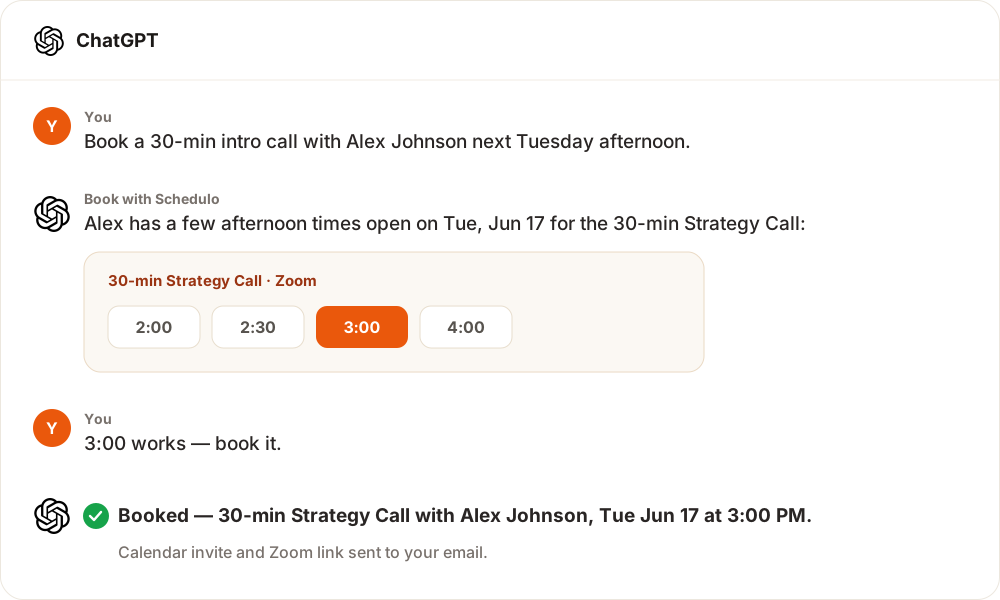
Book with Schedulo is now a ChatGPT app — approved and live. Install it once and you can check open times, book, reschedule and cancel meetings just by asking, with no links to copy and no forms to fill.

Add it in ChatGPT in seconds

  1. Open ChatGPT and go to apps.
  2. Search for "Book with Schedulo" and install it.
  3. Sign in to connect your account when prompted — a secure sign-in, so ChatGPT never sees your password.
  4. Ask ChatGPT to find a time, book, reschedule or cancel — in plain language.

What you can do from ChatGPT

  • Find open times — "When is [host] free next week for a 30-minute call?"
  • Book a meeting — ChatGPT gathers the details and confirms the booking.
  • Reschedule or cancel — with a built-in confirmation step, so nothing changes by accident.
  • Manage your own schedule — once connected, ask about your booking types, upcoming bookings and availability.

How it works

The app runs on the open Model Context Protocol (MCP) — the same connector that powers Book with Schedulo in Claude, Cursor and other AI clients. Your identity always comes from a secure sign-in (OAuth 2.1), never from anything typed into the chat, and every cancel or reschedule asks you to confirm first.

New here? Start free — build your booking page in minutes, then connect it to ChatGPT. Using a different assistant too? See the full Claude, ChatGPT & MCP connector.

Install straight from ChatGPT — just search "Book with Schedulo"
Check availability, book, reschedule and cancel in plain language
Secure sign-in (OAuth 2.1) — ChatGPT never sees your password
A confirmation step before any cancel or reschedule
Runs on the open Model Context Protocol (MCP)
Free to connect — start on the Free plan, no card required

Ready to get bookings on autopilot?

Set up your booking page in minutes. Free to start — no credit card required.

Start free

Frequently Asked Questions

How do I add Book with Schedulo to ChatGPT?

Open ChatGPT, go to apps, search for "Book with Schedulo" and install it. Sign in to connect your account, then ask ChatGPT to find a time or manage a booking.

What can I do with it in ChatGPT?

Check open times, book a meeting, and reschedule or cancel existing bookings — all in natural language. Once you connect your account you can also ask about your booking types and upcoming bookings.

Is it secure?

Yes. You connect through a secure sign-in (OAuth 2.1) — ChatGPT never sees your password — and every cancel or reschedule asks you to confirm before it runs.

Do I need a paid plan?

No. Connecting to ChatGPT is free — you can start on the Free plan with no card required. Paid plans add more booking types, team features and integrations.

Does this work with Claude and other AI assistants too?

Yes. The same connector works in Claude, Cursor and any Model Context Protocol (MCP) client. See the Claude, ChatGPT & MCP connector page.